Flex Workflows: Automate Knowledge Processes with AI
- Mariusz Sieraczkiewicz
- Artificial intelligence , Productivity
- December 14, 2025
Table of Contents
Flex Workflows: Automate Knowledge Processes with AI
Introduction: The Automation Challenge
Imagine you need to automate a complex process—creating training modules, generating technical documentation, or conducting systematic literature reviews. Each task requires a clear workflow from input to output, specific standards and rules to follow, access to existing knowledge and artifacts, connections to external tools and services, quality verification at each step, and human oversight at critical decision points.
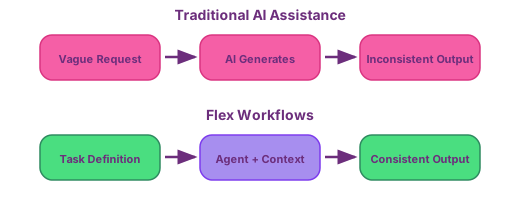
Traditional approaches struggle with this complexity. Manual execution is time-consuming and inconsistent. Simple automation tools lack the flexibility to handle variations. AI assistants, while powerful, produce unpredictable results without proper structure.
Flex Workflows provides the framework to solve this challenge—a systematic approach where specifications, standards, artifacts, and services work together to guide AI agents through complex workflows, producing consistent, high-quality results at scale. Though born from specification-driven software development, the pattern applies universally: research synthesis, technical documentation, training content creation, legal document analysis, business process automation—any knowledge workflow benefits from this structure.
Example: Automating Training Module Creation
Let’s start with a concrete example. We want to automate the process of creating training modules—transforming a topic idea into complete materials including presentations, code examples, and handbooks.
The Workflow
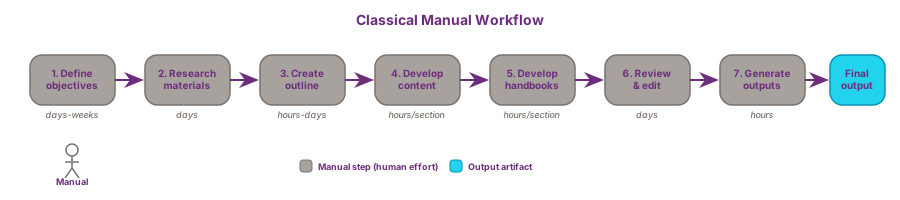
A training module workflow consists of seven distinct steps. To understand how AI transforms this process, we first examine the traditional manual approach, then demonstrate how AI automation changes each step.
Traditionally, creating training modules requires significant human effort at every stage.
The process begins with defining the training module topic and objectives. A subject matter expert or instructional designer conducts interviews with stakeholders, reviews existing materials, and synthesizes requirements into a coherent set of learning objectives. This typically requires multiple meetings and revision cycles spanning days or weeks.
Next comes researching and gathering relevant content and materials. The creator manually searches documentation sites, reads API references, reviews blog posts, and collects code examples. This research phase often takes several days as the practitioner navigates scattered sources, bookmarks relevant pages, and organizes findings into notes.
The third step is creating an outline for the training module. Based on accumulated research, the designer structures topics logically, determines learning progression, and establishes section boundaries. This conceptual work demands expertise in both the subject matter and pedagogical principles.
With an approved outline, the workflow moves to developing content for each section. The creator writes presentation slides manually, crafts code examples from scratch, and ensures consistency with organizational standards. Each section requires hours of careful composition and technical verification.
In parallel or sequence, developing handbooks transforms presentation content into narrative learning materials. The writer expands bullet points into explanatory prose, adds context for self-study learners, and adapts technical content for different learning styles. This rewriting consumes substantial time.
Reviewing and editing brings all generated content together for quality assurance. Colleagues review materials for accuracy, clarity checks happen manually, and multiple revision rounds address feedback. This collaborative process adds days to the timeline.
Finally, generating final outputs requires manual formatting work. The creator exports slides to PDF, converts markdown to HTML, applies style templates, and prepares materials for distribution platforms.
Incorporating AI Automation
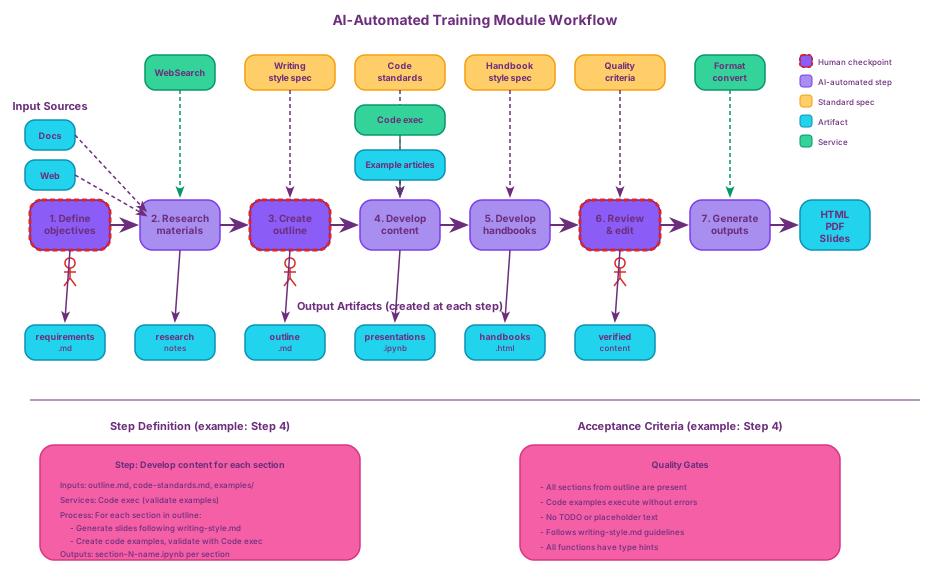
AI transforms this workflow by automating routine tasks while preserving human judgment at critical decision points.
Defining the training module topic and objectives shifts from interview-heavy requirements gathering to structured dialogue with AI. The AI elicits requirements through targeted questions, proposes initial objectives based on similar modules, and helps scope the content. The human reviews and approves the final specification, but the initial synthesis happens in minutes rather than days.
Researching and gathering relevant content and materials becomes automated. Given the topic and objectives, AI searches public documentation, reads API references, and evaluates code examples across multiple sources simultaneously. It can access existing documentation, internal knowledge bases, and intranet resources. The AI curates findings into organized knowledge sources, completing in minutes what previously required days of manual searching.
Creating an outline for the training module leverages AI to propose logical structure based on research findings and pedagogical patterns. However, this step requires strong human confirmation or correction—a genuine “human in the loop” checkpoint. The AI generates draft outlines instantly, but the human applies domain expertise to validate learning progression and adjust emphasis. The output is an approved outline that guides all subsequent work.
Developing content for each section becomes largely automated. AI generates presentation slides and code examples following established standards for text format, detail level, code rules, and example complexity. A review-correct loop with humans ensures quality and accuracy, but the initial content creation that previously consumed hours per section now happens in minutes. This step creates key artifacts: draft presentations and examples ready for refinement.
Developing handbooks transforms from manual rewriting to AI-driven generation. The AI expands presentation content into narrative form, applying standards for narrative style, depth of explanation, and pedagogical approach. Again, a review-correct loop ensures the handbook serves its intended audience, but the bulk composition work shifts from human to machine.
Reviewing and editing combines automated and human verification. AI checks against acceptance criteria, validates code examples, identifies inconsistencies, and suggests improvements. Humans focus on higher-order concerns: pedagogical effectiveness, audience appropriateness, and strategic content decisions. This division of labor accelerates the review cycle.
Generating final outputs becomes fully automated. AI transforms verified content into production-ready formats—HTML, PDF, and slides—applying style templates and formatting standards consistently. What previously required manual export and formatting steps now executes as a single command.
The Pattern
Look at what emerges from this example. Each workflow step has clear inputs, a defined process, and specific outputs. Standards govern how work is done. Existing artifacts provide context. Services enable interaction with external systems. Human checkpoints guard critical decisions.
This structure isn’t unique to training modules. Documentation generation, systematic literature reviews, code refactoring, report creation—any complex process that benefits from AI assistance follows similar patterns. The question becomes: how do we formalize this into a reusable framework?
The General Framework: Workflow Architecture
Let’s abstract this to a universal model that works for any automated workflow.
Understanding the Framework Elements
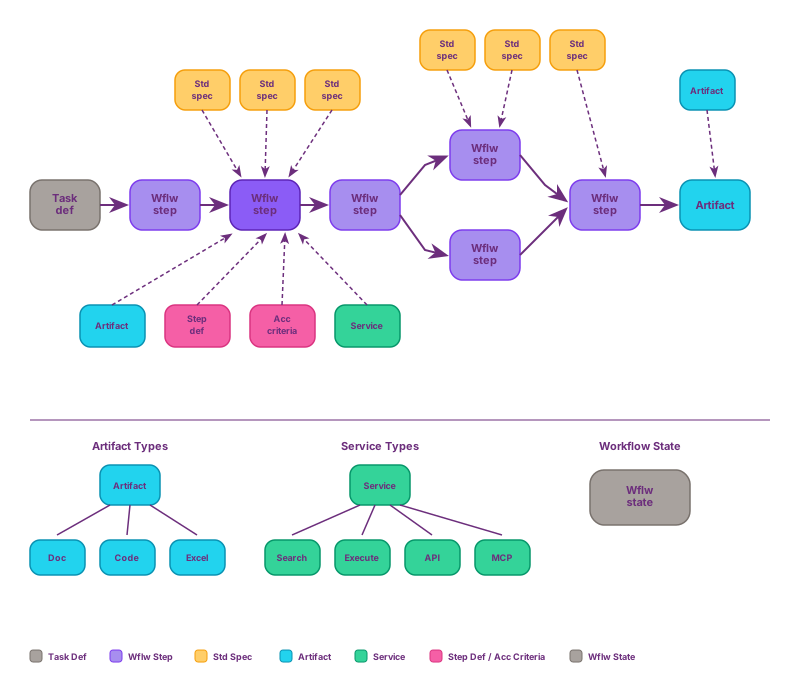
This diagram represents the universal architecture for specification-driven workflows. Every element serves a specific purpose, and understanding their relationships is key to building effective automated systems.
The Task Definition serves as the entry point—a detailed specification of what needs to be accomplished, including goals, constraints, quality criteria, and expected outputs. For training content, this means target audience, learning objectives, depth level, and delivery format. For documentation, it specifies scope, style conventions, and completeness requirements. For research, it defines inclusion criteria, methodology standards, and output formats. Task definitions can emerge through two paths: written upfront as formal specifications by stakeholders, or constructed iteratively through AI-assisted elicitation where structured dialogue progressively clarifies requirements until sufficient detail exists to begin execution.
Workflow Steps form the sequence of operations that transform input to output. Each step is a discrete unit of work that executes in order, has clear inputs, process, and outputs, includes verifiable success criteria, and can be automated, manual, or hybrid. In our training module example, Step 1 might be research (AI automated), Step 2 the outline (AI proposes, human approves), and Step 3 content generation (AI creates, human reviews).
Standard Specs are where the framework derives much of its power. These are reusable specifications that define rules, patterns, and constraints. The critical insight is that multiple workflow steps reference the same standard specs, ensuring consistency across the entire workflow. Examples include coding standards (“All Python code follows PEP 8”), documentation style (“Active voice, second person for instructions”), quality criteria (“All examples must execute without errors”), and pedagogical approach (“Explain why before showing how”). Without shared standards, each step might produce outputs in different styles, creating inconsistency that compounds throughout the workflow.
Step Definitions provide detailed instructions for executing a specific workflow step. Each definition specifies what artifacts, data, or information are required as inputs; what specific actions to take during processing; what to produce as outputs; and how to verify completion through success criteria. A step definition for content generation might read: “Read requirements.md section by section. For each section, generate explanatory text following writing standards, create code examples following code standards, reference examples/ for patterns. Output section-N-name.ipynb as a Jupyter notebook per section. Success criteria: all required topics covered, code examples run without errors, standards compliance verified.”
Acceptance Criteria are measurable conditions that must be met for a step to be considered complete. They enable automated verification, catching issues early before they propagate downstream. Examples include “All sections from outline are present,” “Code examples execute in under 5 seconds,” “No TODO or placeholder text,” “Heading structure follows standards,” and “All functions have type hints.” These criteria are often implemented through scripts or verification agents.
Artifacts represent perhaps the most important insight of the framework: they are bidirectional—both inputs and outputs. As inputs, artifacts include existing documentation that provides context, previous code examples showing patterns, internal knowledge bases with domain expertise, configuration files defining environment, and style guides and templates. As outputs, they include generated content (presentations, handbooks, code), verification reports, processed data, and final deliverables. In the training module workflow, the system reads the examples/ directory for existing code patterns and standards/python-style.md for coding rules, then writes notebook.ipynb as generated training content and verification-report.md as quality check results. This bidirectionality matters because AI doesn’t start from zero—it analyzes existing artifacts to understand context, patterns, and expectations, then generates new artifacts that fit seamlessly into the existing ecosystem.
Workflow State tracks progress through multi-step processes, including the current step, completed steps, pending steps, artifacts produced, and verification status. This enables resumability (interrupted workflows continue from where they stopped), visibility (stakeholders see current status), and coordination (multiple agents know what’s completed and pending).
Services represent the tools, APIs, and external systems that workflow steps can invoke. These are the capabilities that extend AI beyond pure text generation into real-world interaction. Services include search tools (web search, documentation search, code search), data access (databases, APIs, file systems), execution environments (code runners, validators, linters), external integrations (MCP servers, third-party APIs, enterprise systems), and format converters (HTML generators, PDF creators, image processors). In the training module workflow, the research step uses a WebSearch service to find documentation, the content generation step uses a code execution service to validate examples, and the output step uses format conversion services to produce HTML and PDF. Services are distinct from artifacts—artifacts are data at rest (files, documents, configurations), while services are capabilities for action (search, execute, transform). A well-designed workflow explicitly declares which services each step requires, enabling proper configuration, access control, and error handling.
The Power of Interconnection
The framework’s effectiveness comes from how these elements connect. Reusable standards ensure that one standard spec referenced by multiple workflow steps creates consistency across the entire workflow. Context from artifacts means steps read existing artifacts, allowing AI to generate contextual, pattern-matching outputs. Services extend capabilities by giving workflow steps access to search, execution, and external systems. Clear progression with defined inputs, process, and outputs enables predictable, verifiable execution. Automated verification through acceptance criteria catches issues early, before they propagate. Human checkpoints ensure critical decisions require approval, so AI augments judgment rather than replacing it.
Beyond Specifications: Flexible Task Definition
The framework’s name references “specifications,” yet formal specification documents aren’t mandatory. What matters is making tasks specific—clarifying what needs to be done, to what standard, with what inputs and outputs. This specificity can emerge through multiple approaches.
Collaborative Task Clarification
AI-driven dialogue enables task specification without upfront documentation. The AI asks targeted questions, proposes initial structures based on patterns, helps scope complexity, and iteratively refines understanding. What might take days of meetings and document drafts happens through structured conversation in minutes.
Consider automating literature review for Health Technology Assessment. Rather than writing a 20-page specification document, you engage in dialogue:
You: "I need to screen 500 abstracts for an HTA on diabetes treatments."

AI: "To help structure this workflow, I need to clarify several aspects:
1. What are the specific inclusion criteria (population, intervention, outcomes)?
2. What exclusion criteria should be applied?
3. Are there validated screening tools or checklists to follow?
4. What level of agreement is required between reviewers?
5. How should conflicts be resolved?
6. What format should the screening results take?"

You: [Provide answers]

AI: "Based on your requirements, I propose a 4-step workflow:
Step 1: Automated initial screening using PICO criteria
Step 2: Detailed abstract assessment against full inclusion/exclusion checklist
Step 3: Conflict resolution for borderline cases
Step 4: Generate screening report with PRISMA flow diagram

Does this sequence address your needs, or should we adjust the approach?"
Through this exchange, task requirements become concrete—AI elicits details, proposes structure, you validate and correct. The “spec” exists in conversation history and the resulting workflow definition, not necessarily in a standalone document.
Progressive Elaboration During Execution
Specifications can evolve during workflow execution. Initial tasks might be loosely defined, with AI requesting clarification when needed. As work progresses, standards and criteria emerge from actual examples rather than abstract planning.
A documentation generation workflow might start with: “Transform API endpoint definitions into reference documentation following our house style.” The AI begins work, encounters ambiguities—how should error responses be formatted? what level of detail for optional parameters?—and asks for decisions. These decisions become documented patterns for subsequent endpoints, building the standard incrementally.
The Essential Requirement: Specificity
Whether through upfront specifications, AI-driven elicitation, or progressive elaboration, one principle remains constant: vagueness produces inconsistent results. AI needs concrete guidance—what to optimize for, what patterns to follow, what quality looks like. The mechanism for providing that guidance varies; the necessity doesn’t.
Creating Workflows: The Six-Step Meta-Process
The diagram shows what a workflow looks like. But how do you create such workflows? The answer is the six-step meta-process: a systematic methodology for building specification-driven workflows—itself assisted by AI.
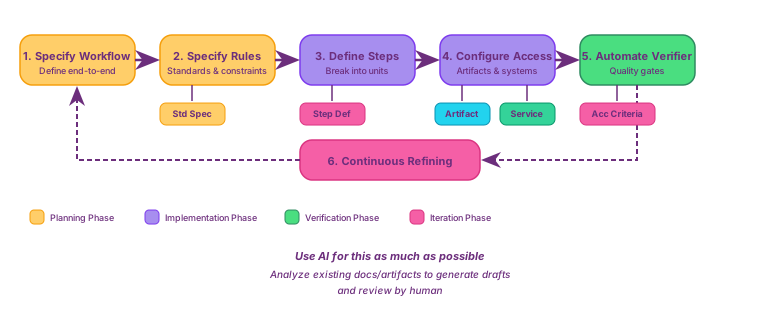
Step 1: Specify the Workflow
The first step defines the high-level workflow from input to output. You need to answer several questions: What are the major phases (planning, implementation, verification, delivery)? What are the handoff points between phases? Where is human review required? What triggers progression to the next step?
AI can help enormously here. You might prompt:
I want to automate [process description]. Analyze the typical workflow
for this process and propose a structured sequence of steps from initial
input to final output. For each step, identify whether it requires human
oversight or can be fully automated.
AI examines existing process documentation, interview transcripts, or similar workflows to propose a draft. You then review and refine it. The output might look like:
Training Module Workflow
Phases: 1) Planning (define objectives, research, create outline),
2) Implementation (generate content including presentations, code, handbooks),
3) Verification (review for quality, accuracy, completeness),
4) Delivery (transform to final formats HTML, PDF).
Handoffs: Planning to Implementation via approved outline,
Implementation to Verification via draft materials,
Verification to Delivery via verified content.
Human Checkpoints: approve objectives and scope, approve outline structure,
final quality review.
Step 2: Specify the Rules
Next, create standard specifications that define how work should be done. These fall into several types: style standards (writing voice, formatting, structure), technical standards (coding conventions, architecture patterns, error handling), quality standards (completeness criteria, accuracy requirements), and process standards (how to handle edge cases, escalation procedures).
AI can analyze existing artifacts and extract implicit patterns into explicit standards. You might prompt:
Analyze these code examples [attach files] and generate a comprehensive
coding standard document covering: naming conventions, structure patterns,
error handling, documentation requirements, and quality expectations.
The resulting standard spec might read:
Code Example Standards
Style: Real implementations, no mocks or placeholders; executable code
that demonstrates actual functionality; clear variable names that explain purpose.
Structure: Imports at top, grouped logically; main logic in functions,
not global scope; one primary concept per example.
Error Handling: All examples must handle expected errors; use try-except
for external operations (file I/O, API calls); provide clear error messages.
Documentation: Docstrings for complex functions; inline comments explain why,
not what; examples include expected output.
Step 3: Define Steps in Detail
For each workflow step, create a detailed step definition with inputs, process, outputs, and success criteria. The template is consistent: what inputs are needed (artifact/data name and description), what process to follow (specific numbered actions), what outputs to produce (artifact names and descriptions), and what success criteria to meet (measurable conditions as a checklist).
AI can generate these definitions:
For the workflow step '[step name]', generate a detailed step definition.
Input artifacts: [list]. Expected output: [description]. Standards to
follow: [references]. Include: specific actions to take, what to produce,
and measurable success criteria.
AI creates draft step definitions following the template, which you review for accuracy and completeness. The output might look like:
Step Definition: Develop Content
Inputs:
- outline.md (approved section structure)
- code-standards.md (coding conventions)
- examples/ (reference implementations)
Process:
1) Read outline section by section
2) For each section, generate explanatory text following writing-style.md
3) Create code examples demonstrating key concepts
4) Validate examples execute without errors
5) Add inline comments explaining non-obvious logic
Outputs:
- section-N-name.ipynb per section (Jupyter notebook with narrative and code)
Success Criteria:
- All sections from outline are present
- Code examples execute without errors
- No TODO or placeholder text
- Follows writing-style.md guidelines
- All functions have type hints
Step 4: Configure Access to Artifacts and Services
Connect workflow steps to artifacts and configure the services they need. This involves mapping file access (what to read, where to write) and setting up external capabilities (MCP servers, CLI tools, APIs).
For artifacts, identify what context each step needs and where outputs go. AI can help map your ecosystem:
Analyze this codebase structure [provide tree]. For the "Develop Content"
step, identify: 1) files to read for context, 2) output locations,
3) external capabilities needed.
The artifact configuration might look like:
Develop Content Step - Artifact Access:
Read:
- outline.md
- standards/writing-style.md
- standards/code-standards.md
- examples/*.py
Write:
- sections/*.ipynb
For services, configure the actual tools. MCP servers provide structured access to external capabilities:
{
  "mcpServers": {
    "filesystem": {
      "command": "npx",
      "args": ["-y", "@anthropic/mcp-filesystem", "./standards", "./examples"]
    },
    "code-executor": {
      "command": "python",
      "args": ["-m", "mcp_code_executor", "--timeout", "30"]
    }
  }
}
CLI tools can be wrapped as services in step definitions:
Services Configuration:
- Code validation: `pytest sections/ --tb=short`
- Linting: `ruff check sections/ --output-format=json`
- WebSearch: MCP server "brave-search" for API documentation lookup
The complete service configuration for a step:
Develop Content Step - Services:
Code Execution:
  tool: mcp/code-executor
  purpose: validate all examples run without errors
  timeout: 30s
Web Search:
  tool: mcp/brave-search
  purpose: fetch latest API documentation
  query_template: "{library} {version} documentation {topic}"
Format Validation:
  tool: cli/nbformat
  command: python -m nbformat.validator sections/*.ipynb
Step 5: Automate Steps Verifier
Implement quality gates based on acceptance criteria. This involves defining checks (what to verify from acceptance criteria), automation (automated tests where possible), and actions (what happens on failure).
AI can generate verification procedures:
Create an automated verification procedure for this step definition [attach].
Generate:
1) checklist of all acceptance criteria,
2) automated tests where possible (scripts, linters, validators),
3) manual review procedures for subjective criteria,
4) failure handling (what specific fixes to request).
The verification procedure might include:
Automated Checks:
- Run all code examples with pytest
- Lint for style compliance
Structure Validation:
- Check all required concepts are covered
Manual Review Checklist:
- Examples demonstrate real functionality
- Complexity appropriate for audience
Acceptance Criteria:
- All code executes without errors
- Linter passes with zero warnings
- All concepts from requirements demonstrated
- No placeholder code
Actions on Failure:
- Execution errors: provide message and traceback, request fix
- Linter failures: provide specific violations, request compliance
- Missing concepts: list missing items, request addition
Step 6: Continuous Refining
As workflows execute, capture learnings and feed them back into the workflow specification. This creates three feedback loops: verification failures become rules (repeated issues become documented patterns in standards), execution patterns inform step definitions (successful/failed approaches refine procedures), and user feedback updates acceptance criteria (stakeholder changes update quality expectations).
AI can analyze execution data:
Analyze these verification reports [attach]. Identify patterns in failures.
For each pattern, propose:
1) update to standards to prevent recurrence,
2) refinement to step definitions for clarity,
3) additional acceptance criteria to catch earlier.
Consider a real example: generated code examples frequently missed error handling. Analysis showed 15 of 20 verification runs flagged missing try-except blocks, with a pattern of external operations (file I/O, API calls) lacking error handling. The refinement actions:
Pattern Identified: External operations lacking error handling
- 15 of 20 verification runs flagged missing try-except blocks
- Pattern: file I/O, API calls without error handling
Refinement Actions:
- Standard spec: explicitly require try-except for external operations
- Step definition: add "identify external operations and add error handling"
- Acceptance criteria: include "all external operations have try-except"
Result: Future generation references updated standard, follows refined process,
meets enhanced criteria—preventing pattern from recurring.
Implementation in Practice
The framework concepts translate into working systems through three implementation approaches: AI execution engines, process definition frameworks, and custom implementations. Each serves different needs and constraints.
AI Execution Engines
AI execution engines provide the runtime environment for automated workflows. These tools enable AI to read files, interact with services, execute commands, and maintain conversation state across multi-step processes. The key insight: these engines work for any knowledge workflow, not just software development.
Claude Code (Anthropic’s CLI tool), Gemini CLI (Google’s command-line assistant), and GitHub Copilot CLI all provide the core capabilities needed for workflow execution: file system access, web search, command execution, and persistent context. Whether the workflow involves literature review, documentation generation, training content creation, or software development, the execution mechanics remain the same—AI reads artifacts, applies standards, produces outputs, and tracks progress.
These engines handle the “how” of execution—they’re the runtime that interprets your workflow definitions and coordinates AI actions. You define what should happen (specifications, standards, step definitions), and the engine executes those definitions regardless of domain.
Process Definition Frameworks
Process definition frameworks provide ready-to-use workflow structures, templates, and conventions. Rather than designing workflows from scratch, you adapt proven patterns to your domain.
BMAD-METHOD (Breakthrough Method for Agile AI-Driven Development) offers a comprehensive agent framework with extensive customization options. Though developed for software workflows, its architecture—multi-agent coordination, phased execution, human checkpoints—transfers to other knowledge domains.
spec-kit (GitHub’s toolkit) provides lightweight templates and conventions for specification-driven AI workflows. Its straightforward structure makes it accessible for teams new to workflow automation.
Agent OS implements complete state management and workflow orchestration with structured interfaces between planning, execution, and verification phases.
These frameworks accelerate implementation by providing tested structures. You customize their specifications and standards to your domain rather than building workflow architecture from first principles.
Custom Implementations
Sophisticated frameworks aren’t always necessary. Many workflows succeed with simple file-based state management, custom prompts, and personal standards.
A researcher automating literature synthesis might maintain:
research-workflow/
├── state.json              # Current step, completed tasks
├── standards/
│   ├── screening.md        # Inclusion/exclusion criteria
│   └── extraction.md       # Data extraction templates
├── prompts/
│   ├── screen-abstract.md  # Prompt template for screening
│   └── extract-data.md     # Prompt template for extraction
├── artifacts/
│   ├── abstracts/          # Input abstracts to screen
│   └── results/            # Screening decisions
└── workflow.md             # Step sequence and verification
State tracking uses JSON files. Step definitions live in markdown. AI reads the current step from state.json, loads the relevant prompt template, accesses necessary standards, processes inputs, writes outputs, and updates state. Simple Python scripts or shell commands orchestrate progression.
This approach provides complete control. You define exactly how state is managed, what formats to use, how verification happens, and where artifacts live. The tradeoff: you build infrastructure that frameworks provide ready-made.
Choosing an Approach
Selection criteria differ by category. For execution engines, the deciding factors are practical: team familiarity with the tool, organizational availability, and existing infrastructure. Claude Code, Gemini CLI, and Copilot CLI offer comparable capabilities—choose based on which is accessible and comfortable for your team.
For process definition frameworks, the trade-off is flexibility versus learning curve. BMAD-METHOD provides the most customization but requires significant investment to master. spec-kit offers the gentlest learning curve, making it ideal for teams new to workflow automation, though its templates are less adaptable to unusual requirements. Agent OS balances structure with flexibility, providing robust orchestration without overwhelming complexity.
Custom implementations make sense when workflows are unique, teams need complete control, or requirements are simple enough that framework overhead adds unnecessary complexity.
These approaches combine naturally. You might use Claude Code as the execution engine, adapt BMAD workflow templates for your domain, and customize standards to organizational needs. The framework concepts remain constant; implementation choices adapt to context.
Second Example: From Feature Description to Merged Code
With implementation options understood, let’s see the framework applied to a domain every developer knows intimately: implementing a feature from Jira ticket to merged code in a repository. This example showcases production-ready specifications with complete step definitions, standards, and AI prompts.
The Challenge
Software development teams face recurring challenges: inconsistent requirements interpretation leading to rework, unclear Definition of Ready causing mid-sprint scope creep, varying code quality across team members, inconsistent test coverage, lengthy review cycles with repetitive feedback, and manual merge processes prone to errors. Traditional approaches rely heavily on individual judgment, tribal knowledge, and informal conventions that don’t scale.
Applying the Six-Step Meta-Process
Let’s build this workflow using the six-step meta-process. We’ll first design the complete workflow structure, then dive into detailed implementations.
Goal: “Implement feature PROJ-123 from Jira, following team standards, with full test coverage and successful code review, merged to main branch.”
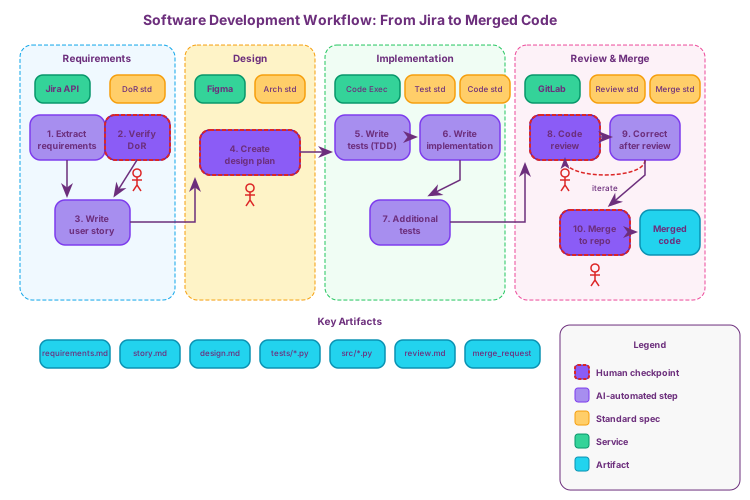
Meta-Step 1: Specify the Workflow
First, we define the high-level workflow from input (Jira ticket) to output (merged code). The workflow has ten steps with four human checkpoints:
| Step | Name | Description | Human Checkpoint |
|---|---|---|---|
| 1 | Extract Requirements | Fetch Jira ticket, identify ambiguities, generate clarifying questions | No |
| 2 | Verify DoR | Evaluate against Definition of Ready checklist, get approval | Yes (PO/Tech Lead) |
| 3 | Write User Story | Transform to standard story format with Given/When/Then criteria | No |
| 4 | Design Plan | Create technical design, API contracts, implementation sequence | Yes (Tech Lead) |
| 5 | Write Tests (TDD) | Map acceptance criteria to tests, implement failing tests | No |
| 6 | Write Implementation | Implement code to pass tests, run linter and type checker | No |
| 7 | Additional Tests | Add integration, security, and coverage gap tests | No |
| 8 | Code Review | Create MR, run CI, apply review checklist, collect feedback | Yes (Peer + Lead) |
| 9 | Correct After Review | Address MUST FIX and SHOULD FIX items, update MR | No |
| 10 | Merge | Final approval, execute merge, update Jira status | Yes (Tech Lead) |
Meta-Step 2: Specify the Rules (Standards)
Next, we identify all standard specifications needed across the workflow:
| Standard | Purpose | Used By Steps |
|---|---|---|
| requirements-clarity.md | Ambiguity detection rules, completeness criteria | 1, 2 |
| dor-checklist.md | Definition of Ready criteria (required + conditional) | 1, 2 |
| story-format.md | User story structure, Given/When/Then format, quality rules | 3 |
| architecture-guidelines.md | Design principles (SOLID), component structure, API conventions | 4 |
| coding-standards.md | Python style, naming, function design, error handling, security | 4, 6, 9 |
| testing-standards.md | Test structure, naming, coverage requirements, assertions | 5, 7 |
| review-checklist.md | Correctness, quality, testing, security, performance, docs | 8 |
| correction-process.md | Priority order, log format, commit messages, re-review triggers | 9 |
| merge-process.md | Pre-merge checklist, merge strategy, post-merge actions, rollback | 10 |
Meta-Step 3: Define Steps in Detail
For each workflow step, we create a detailed step definition specifying:
- Inputs: What artifacts/data the step needs
- Process: Specific actions to take (numbered)
- Outputs: What artifacts to produce
- Human checkpoint: Whether approval is required and by whom
(Detailed step definitions provided in the Implementation Details section below)
Meta-Step 4: Configure Access to Artifacts and Services
Services enable workflow steps to interact with external systems:
| Service | Type | Capabilities | Used By Steps |
|---|---|---|---|
| Jira | REST API | read_issue, update_status, add_comment, get_attachments | 1, 10 |
| Figma | MCP Server | read_designs, export_assets, get_design_tokens | 1, 4 |
| GitLab | REST API | create_branch, commit_files, create_merge_request, merge | 8, 9, 10 |
| Code Executor | CLI | pytest, ruff, mypy | 5, 6, 7, 8, 9 |
Artifacts flow through the workflow:
| Artifact | Type | Created By | Read By |
|---|---|---|---|
| requirements.md | Specification | Step 1 | Steps 2, 3 |
| story.md | Specification | Step 3 | Steps 4, 5, 8 |
| design-proposal.md | Specification | Step 4 | Steps 5, 6 |
| tests/*.py | Code | Steps 5, 7 | Steps 6, 8, 9 |
| src/*.py | Code | Step 6 | Steps 7, 8, 9 |
| review-feedback.md | Feedback | Step 8 | Step 9 |
| correction-log.md | Log | Step 9 | Step 10 |
Meta-Step 5: Automate Steps Verifier
Each step has acceptance criteria that serve as quality gates:
| Step | Key Acceptance Criteria |
|---|---|
| 1 | All Jira fields extracted, no ambiguous terms unaddressed, each AC testable |
| 2 | All Required DoR items pass, human approver recorded, FAIL items have remediation |
| 3 | Story follows format, role is specific, all AC in Given/When/Then |
| 4 | All AC addressed in design, components identified, risks documented |
| 5 | Every AC has test, tests can be collected, test-coverage-map.md created |
| 6 | All tests pass, no linter warnings, type hints on all functions, coverage >= 80% |
| 7 | Line coverage >= 80%, branch coverage >= 70%, integration tests present |
| 8 | CI pipeline passes, review checklist applied, feedback documented |
| 9 | All MUST FIX addressed, tests pass, correction-log.md documents changes |
| 10 | All approvals present, no conflicts, Jira updated to Done |
Meta-Step 6: Continuous Refining
After workflow execution, capture learnings and feed them back:
- Verification failures → Update standards to prevent recurrence
- Execution patterns → Refine step definitions
- User feedback → Update acceptance criteria
(Detailed refinement example provided at the end of this section)
Implementation Details
Now let’s examine each step with its complete specification, including standards, acceptance criteria, and AI prompts. First, the supporting infrastructure—the services configuration that enables workflow steps to interact with external systems:
services:
  jira:
    type: rest-api
    base_url: https://company.atlassian.net/rest/api/3
    auth: api_token
    capabilities:
      - read_issue
      - update_status
      - add_comment
      - get_attachments

  figma:
    type: mcp-server
    command: npx @anthropic/mcp-figma
    capabilities:
      - read_designs
      - export_assets
      - get_design_tokens

  gitlab:
    type: rest-api
    base_url: https://gitlab.company.com/api/v4
    auth: personal_token
    capabilities:
      - create_branch
      - commit_files
      - create_merge_request
      - merge
      - get_pipeline_status

  code_executor:
    type: cli
    commands:
      - pytest
      - ruff
      - mypy
    timeout: 300s
Workflow Step 1: Extract and Clarify Requirements
Step Definition:
step: extract_and_clarify_requirements
inputs:
  - jira_ticket_id: "PROJ-123"
  - standards/requirements-clarity.md
  - standards/dor-checklist.md
process:
  1. Fetch ticket from Jira API (title, description, acceptance criteria, attachments)
  2. Extract linked Figma designs if present
  3. Parse acceptance criteria into testable statements
  4. Apply ambiguity detection rules from requirements-clarity.md
  5. Generate clarifying questions for each ambiguity
  6. Document assumptions that need validation
outputs:
  - requirements.md: "Structured requirements with clarifications needed"
  - clarifying-questions.md: "Questions for product owner"
human_checkpoint: false (unless critical ambiguities block progress)
Standards - Requirements Clarity:
# Requirements Clarity Standard

## Completeness Criteria
- User goal clearly stated (who does what to achieve which outcome)
- All acceptance criteria are independently testable
- Edge cases explicitly identified (empty states, errors, limits)
- Error scenarios documented with expected behavior
- Dependencies on other systems/features listed
- UI/UX requirements linked to Figma frames

## Ambiguity Detection Rules
Flag as ambiguous:
- Pronouns without clear antecedents ("it should update", "they can access")
- Vague quantities ("some users", "many items", "quickly", "efficiently")
- Undefined terms not in project glossary
- Missing error handling ("user enters data" - what if invalid?)
- Implicit assumptions ("logged-in user" - what auth level?)
- Relative references ("similar to feature X" - which aspects?)

## Resolution Process
- Mark each ambiguity with [NEEDS_CLARIFICATION: specific question]
- Propose default assumption with [ASSUMED: assumption, pending confirmation]
- Link to related requirements that may conflict
Acceptance Criteria:
acceptance_criteria:
  - All Jira fields extracted (title, description, AC, attachments, links)
  - No ambiguous terms remain unaddressed (flagged or resolved)
  - Each acceptance criterion is independently testable
  - All external dependencies explicitly listed
  - requirements.md follows template structure
  - Figma links resolved to specific frame references
AI Prompt:
Read Jira ticket {ticket_id} using the Jira API.

Extract:
- Title and description
- All acceptance criteria (numbered list)
- Linked Figma designs (resolve to frame URLs)
- Attachments and their purposes
- Related tickets and dependencies

Apply the Requirements Clarity Standard to identify:
1. Ambiguous terms or phrases (list each with line reference)
2. Missing acceptance criteria (what's implied but not stated)
3. Untestable requirements (subjective or unmeasurable)
4. Undefined edge cases (empty states, limits, errors)
5. Implicit assumptions needing confirmation

For each issue found, generate a specific clarifying question.

Output requirements.md with:
- Structured requirements following template
- [NEEDS_CLARIFICATION] markers for unresolved items
- [ASSUMED] markers for proposed defaults
- Traceability to original Jira fields
Workflow Step 2: Verify Definition of Ready (DoR) [Human Checkpoint]
Step Definition:
step: verify_definition_of_ready
inputs:
  - requirements.md
  - standards/dor-checklist.md
  - clarifying-questions.md (if exists)
process:
  1. Load DoR checklist criteria
  2. Evaluate requirements.md against each criterion
  3. Mark criteria as PASS/FAIL/PARTIAL with evidence
  4. Calculate overall DoR score (percentage passed)
  5. Generate DoR report with gaps and recommendations
  6. Present to human for approval or rejection
outputs:
  - dor-report.md: "DoR evaluation with pass/fail per criterion"
  - story-ready.md: "Approved story ready for development" (if passed)
human_checkpoint: true
  approval_required: "Product Owner or Tech Lead"
  action_on_reject: "Return to Step 1 with specific gaps to address"
Standards - Definition of Ready:
# Definition of Ready Checklist

## Required (all must pass)
- [ ] User story follows format: "As a [role], I want [goal], so that [benefit]"
- [ ] Acceptance criteria are specific, measurable, testable
- [ ] No open questions or unresolved ambiguities
- [ ] Technical approach agreed (or explicitly marked as spike)
- [ ] Dependencies identified and available
- [ ] Estimate provided (or explicitly marked for refinement)

## Conditional (pass if applicable)
- [ ] UI mockups linked and approved (if user-facing)
- [ ] API contract defined (if integration involved)
- [ ] Data migration plan documented (if schema changes)
- [ ] Security review completed (if auth/data changes)
- [ ] Performance requirements specified (if SLA-critical)

## Scoring
- PASS: All Required items checked, all applicable Conditional items checked
- PARTIAL: All Required items checked, some Conditional items pending
- FAIL: Any Required item unchecked
Acceptance Criteria:
acceptance_criteria:
  - All Required DoR items evaluated with evidence
  - Overall DoR score calculated correctly
  - FAIL items have specific remediation steps
  - Human approver recorded with timestamp
  - story-ready.md only created on PASS status
  - Rejection loops back to Step 1 with gap analysis
AI Prompt:
Evaluate requirements.md against the Definition of Ready Checklist.

For each checklist item:
1. Determine if it applies to this story (Required always applies)
2. Find evidence in requirements.md that satisfies the criterion
3. Mark as PASS (with evidence quote), FAIL (with gap description), or N/A

Calculate DoR score:
- Required items: count passed / total required
- Conditional items: count passed / count applicable
- Overall: both must be 100% for PASS status

Generate dor-report.md with:
- Summary: PASS/PARTIAL/FAIL with scores
- Per-item evaluation with evidence or gap
- For FAIL items: specific questions or actions to resolve
- Recommendation: approve for development or return for clarification

Present to {approver_role} for decision.
If rejected, document rejection reason and required changes.
Workflow Step 3: Write User Story Format
Step Definition:
step: write_user_story_format
inputs:
  - story-ready.md (approved from Step 2)
  - standards/story-format.md
  - templates/user-story-template.md
process:
  1. Extract core user goal and benefit from requirements
  2. Structure as user story format (As a... I want... So that...)
  3. Convert acceptance criteria to Given/When/Then format
  4. Add technical notes section for implementation guidance
  5. Include test scenario outlines
  6. Link to original Jira ticket for traceability
outputs:
  - story.md: "Complete user story in standard format"
human_checkpoint: false
Standards - Story Format:
# User Story Format Standard

## Story Structure
```
# [PROJ-123] Story Title

## User Story
As a [specific role with context],
I want [concrete action/capability],
So that [measurable business benefit].

## Acceptance Criteria
### AC1: [Criterion Name]
- Given [precondition/context]
- When [action/trigger]
- Then [expected outcome]
- And [additional outcomes if any]

### AC2: [Criterion Name]
...

## Technical Notes
- Implementation approach: [brief description]
- Components affected: [list]
- API changes: [if any]
- Database changes: [if any]

## Test Scenarios
1. Happy path: [description]
2. Edge case - [name]: [description]
3. Error case - [name]: [description]

## References
- Jira: [link]
- Figma: [link]
- Related stories: [links]
```

## Quality Rules
- Role must be specific (not "user" but "authenticated customer")
- Action must be concrete and verifiable
- Benefit must be measurable or observable
- Each AC must be independently testable
- Technical notes inform but don't constrain implementation
Acceptance Criteria:
acceptance_criteria:
  - Story follows "As a... I want... So that..." format
  - Role is specific and contextual (not generic "user")
  - All acceptance criteria in Given/When/Then format
  - Each AC maps to at least one test scenario
  - Technical notes present but don't over-specify
  - All references linked and accessible
  - No ambiguous terms (validated against clarity standard)
AI Prompt:
Transform story-ready.md into a complete user story following story-format.md.

1. Identify the primary user role - be specific:
   - Not "user" but "registered customer" or "admin with billing access"
   - Include relevant context (permissions, state, journey stage)

2. Extract the core action:
   - What specific capability does the user need?
   - Make it concrete and verifiable

3. Articulate the benefit:
   - Why does this matter to the user/business?
   - Make it measurable where possible

4. Convert each acceptance criterion to Given/When/Then:
   - Given: establish the precondition clearly
   - When: single action that triggers the behavior
   - Then: observable, testable outcome

5. Add technical notes:
   - Summarize implementation approach from requirements
   - List affected components
   - Note API/DB changes if any

6. Generate test scenarios:
   - One happy path scenario
   - Edge cases from requirements
   - Error scenarios (invalid input, failures)

Output story.md following the template exactly.
Workflow Step 4: Create Design and Implementation Plan [Human Checkpoint]
Step Definition:
step: create_design_implementation_plan
inputs:
  - story.md
  - figma-designs/ (via Figma service)
  - existing codebase structure (via file system)
  - standards/architecture-guidelines.md
  - standards/coding-standards.md
process:
  1. Analyze story requirements and acceptance criteria
  2. Fetch and analyze Figma designs for UI requirements
  3. Explore existing codebase for patterns and conventions
  4. Identify components to create or modify
  5. Design API contracts if needed
  6. Plan database schema changes if needed
  7. Outline implementation sequence
  8. Identify risks and mitigation strategies
  9. Present proposal for human approval
outputs:
  - design-proposal.md: "Technical design with implementation plan"
human_checkpoint: true
  approval_required: "Tech Lead or Senior Developer"
  action_on_reject: "Revise proposal based on feedback"
Standards - Architecture Guidelines:
# Architecture Guidelines

## Design Principles
- Single Responsibility: each module/class has one reason to change
- Dependency Inversion: depend on abstractions, not concretions
- Interface Segregation: small, focused interfaces
- Open/Closed: open for extension, closed for modification

## Component Structure
```
src/
├── api/           # API endpoints (thin controllers)
├── services/      # Business logic (domain services)
├── repositories/  # Data access (database operations)
├── models/        # Domain models and DTOs
├── utils/         # Shared utilities
└── config/        # Configuration management
```

## API Design
- RESTful conventions (resources, HTTP verbs, status codes)
- Consistent error response format: {error: {code, message, details}}
- Pagination for list endpoints: {data: [], pagination: {page, limit, total}}
- Versioning in URL path: /api/v1/resource

## Database Changes
- All changes via migrations (no manual DDL)
- Backward compatible changes preferred
- Breaking changes require migration plan

## Error Handling
- Exceptions for exceptional cases only
- Return Result types for expected failures
- Log errors with correlation IDs
- User-facing messages separate from technical details
Acceptance Criteria:
acceptance_criteria:
  - All acceptance criteria from story.md addressed in design
  - Components identified with clear responsibilities
  - API contracts defined (if applicable) with request/response schemas
  - Database changes documented with migration approach
  - Implementation sequence logical (dependencies respected)
  - Risks identified with mitigation strategies
  - Follows architecture-guidelines.md patterns
  - Human approver recorded with timestamp
  - Revision history tracked if rejected and revised
AI Prompt:
Create a technical design and implementation plan for story.md.

1. Analyze requirements:
   - List each acceptance criterion
   - Identify technical implications of each

2. Examine Figma designs (if UI involved):
   - Extract component structure from frames
   - Note design tokens (colors, spacing, typography)
   - Identify interactive states and transitions

3. Explore existing codebase:
   - Find similar features for patterns to follow
   - Identify shared components to reuse
   - Note coding conventions in use

4. Design the solution:
   - List components to create (with responsibility)
   - List components to modify (with changes)
   - Define API contracts (endpoints, request/response)
   - Document database changes (schema, migrations)

5. Plan implementation sequence:
   - Order tasks by dependencies
   - Identify what can be parallelized
   - Estimate complexity (S/M/L) per task

6. Assess risks:
   - Technical risks (performance, compatibility)
   - Dependencies on other teams/systems
   - Mitigation strategies for each

Output design-proposal.md with all sections.
Present to {approver_role} for review.
Workflow Step 5: Write Initial Tests (TDD)
Step Definition:
step: write_initial_tests
inputs:
  - story.md (acceptance criteria)
  - design-proposal.md (component structure)
  - standards/testing-standards.md
  - existing tests/ directory for patterns
process:
  1. Map each acceptance criterion to test cases
  2. Write test file structure following conventions
  3. Implement test cases (initially failing)
  4. Add edge case tests from story scenarios
  5. Add error case tests
  6. Verify tests are syntactically correct (can be collected)
  7. Document test coverage mapping
outputs:
  - tests/*.py: "Test files for the feature"
  - test-coverage-map.md: "AC to test mapping"
human_checkpoint: false
Standards - Testing Standards:
# Testing Standards

## Test Structure
```python
# tests/test_{feature_name}.py

import pytest
from src.services import FeatureService
from tests.fixtures import create_test_user, create_test_data

class TestFeatureName:
    """Tests for [Feature Name] - PROJ-123"""

    # Happy path tests
    def test_should_[expected_behavior]_when_[condition](self):
        # Arrange
        ...
        # Act
        ...
        # Assert
        ...

    # Edge case tests
    def test_should_handle_empty_input(self):
        ...

    # Error case tests
    def test_should_raise_validation_error_when_invalid_input(self):
        ...
```

## Naming Conventions
- Test files: test_{feature_name}.py
- Test classes: Test{FeatureName}
- Test methods: test_should_{behavior}_when_{condition}

## Coverage Requirements
- Each acceptance criterion has at least one test
- Happy path: minimum one test per AC
- Edge cases: empty, null, boundary values
- Error cases: invalid input, unauthorized, not found

## Test Independence
- Each test must be independent (no shared state)
- Use fixtures for setup, not class-level state
- Clean up any created resources

## Assertions
- One logical assertion per test (multiple asserts OK if single concept)
- Use descriptive assertion messages
- Prefer specific assertions (assert_equal) over generic (assert)
Acceptance Criteria:
acceptance_criteria:
  - Every acceptance criterion has at least one test
  - Test file structure follows testing-standards.md
  - Test naming follows convention: test_should_{behavior}_when_{condition}
  - Tests can be collected by pytest (no syntax errors)
  - Edge cases from story scenarios covered
  - Error cases covered (invalid input, auth failures)
  - test-coverage-map.md shows AC to test traceability
  - Tests initially fail (TDD red phase)
AI Prompt:
Write initial tests for story.md following testing-standards.md (TDD approach).

1. Read story.md acceptance criteria and test scenarios
2. Read design-proposal.md for component structure and interfaces
3. Examine existing tests/ for patterns and fixtures

For each acceptance criterion:
- Create test method with descriptive name
- Implement Arrange/Act/Assert structure
- Use existing fixtures or define new ones needed
- Add assertion with clear failure message

Add edge case tests:
- Empty/null inputs
- Boundary values
- Missing optional fields

Add error case tests:
- Invalid input types
- Unauthorized access attempts
- Resource not found scenarios

Output:
- tests/test_{feature_name}.py with all test cases
- tests/conftest.py additions if new fixtures needed
- test-coverage-map.md showing:
  | AC ID | AC Description | Test Method | Test Type |
  |-------|----------------|-------------|-----------|

Verify tests can be collected: pytest --collect-only tests/test_{feature_name}.py
Workflow Step 6: Write Implementation
Step Definition:
step: write_implementation
inputs:
  - design-proposal.md
  - tests/*.py (from Step 5)
  - standards/coding-standards.md
  - existing src/ for patterns
process:
  1. Read design proposal for component structure
  2. Read tests to understand expected behavior
  3. Implement each component following standards
  4. Run tests after each component (TDD green phase)
  5. Run linter and fix violations
  6. Run type checker and add missing hints
  7. Refactor if needed (TDD refactor phase)
outputs:
  - src/*.py: "Implementation files"
services_used:
  - code_executor: pytest, ruff, mypy
human_checkpoint: false
Standards - Coding Standards:
# Coding Standards

## Python Style
- Follow PEP 8 with max line length 100
- Use type hints for all function signatures
- Use docstrings for public functions (Google style)
- Imports: stdlib, third-party, local (blank line between groups)

## Naming Conventions
- Classes: PascalCase
- Functions/methods: snake_case
- Constants: UPPER_SNAKE_CASE
- Private: prefix with underscore

## Function Design
- Maximum 20 lines per function (excluding docstring)
- Maximum 4 parameters (use dataclass for more)
- Single return type (use Union sparingly)
- No side effects in functions named get_*, is_*, has_*

## Error Handling
- Use custom exceptions inheriting from base AppError
- Never catch bare Exception
- Always include context in error messages
- Log errors with structured data (not string interpolation)

## Code Organization
```python
# Standard structure for a service module
from typing import Optional
from dataclasses import dataclass

from external_lib import something

from src.models import DomainModel
from src.repositories import Repository
from src.exceptions import DomainError


@dataclass
class ServiceInput:
    """Input DTO for the service."""
    field: str


class FeatureService:
    """Service handling [feature] business logic."""

    def __init__(self, repository: Repository) -> None:
        self._repository = repository

    def execute(self, input_data: ServiceInput) -> DomainModel:
        """Execute the feature logic."""
        ...
```

## Security
- No hardcoded secrets (use environment variables)
- Validate all external input
- Use parameterized queries (no string concatenation for SQL)
- Sanitize output to prevent XSS
Acceptance Criteria:
acceptance_criteria:
  - All tests pass (pytest exit code 0)
  - No linter warnings (ruff check passes)
  - Type hints on all public functions (mypy passes)
  - No hardcoded credentials or secrets
  - Code coverage >= 80% for new code
  - Follows coding-standards.md patterns
  - Functions under 20 lines (excluding docstrings)
  - No TODO comments in committed code
AI Prompt:
Implement the feature to pass all tests, following coding-standards.md.

1. Read design-proposal.md for:
   - Component structure and responsibilities
   - API contracts and interfaces
   - Database schema if applicable

2. Read tests/*.py to understand:
   - Expected function signatures
   - Input/output expectations
   - Error conditions to handle

3. Examine existing src/ for:
   - Patterns to follow
   - Base classes to extend
   - Utilities to reuse

4. Implement each component:
   - Start with models/DTOs
   - Then repositories/data access
   - Then services/business logic
   - Finally API endpoints/controllers

5. After each file, run:
   - pytest tests/test_{feature}.py (must pass)
   - ruff check src/{file}.py (must pass)
   - mypy src/{file}.py (must pass)

6. Fix any failures before proceeding to next file

Output src/*.py files with implementation.
Report final test results and coverage.
Workflow Step 7: Write Additional Tests
Step Definition:
step: write_additional_tests
inputs:
  - src/*.py (implementation from Step 6)
  - tests/*.py (initial tests)
  - standards/testing-standards.md
  - coverage report from Step 6
process:
  1. Analyze coverage report for gaps
  2. Identify untested code paths
  3. Add integration tests if multiple components
  4. Add performance tests if SLA requirements
  5. Add security tests if auth/data involved
  6. Verify all tests pass
outputs:
  - tests/*.py: "Updated with additional tests"
  - coverage-report.md: "Final coverage analysis"
services_used:
  - code_executor: pytest --cov
human_checkpoint: false
Standards - Additional Testing:
# Additional Testing Standards

## Integration Tests
- Test component interactions (service -> repository -> DB)
- Use test database or in-memory alternatives
- Test API endpoints end-to-end
- Verify error propagation across layers

## Performance Tests (if SLA specified)
- Benchmark critical paths
- Test with realistic data volumes
- Document baseline metrics
- Flag regressions > 10%

## Security Tests (if auth/data involved)
- Test authentication required endpoints without auth
- Test authorization (user A can't access user B's data)
- Test input validation (SQL injection, XSS attempts)
- Test rate limiting if applicable

## Coverage Analysis
- Line coverage >= 80%
- Branch coverage >= 70%
- Focus on business logic, not boilerplate
- Document intentionally uncovered code

## Test Organization
```
tests/
├── unit/           # Isolated unit tests
├── integration/    # Component integration tests
├── e2e/            # End-to-end API tests
└── fixtures/       # Shared test data and utilities
```
Acceptance Criteria:
acceptance_criteria:
  - Line coverage >= 80% for feature code
  - Branch coverage >= 70%
  - Integration tests cover component interactions
  - Security tests present if auth/data involved
  - All tests pass (no flaky tests)
  - No untested error paths in business logic
  - Coverage gaps documented with justification
AI Prompt:
Analyze test coverage and add additional tests to meet standards.

1. Run coverage analysis:
   pytest --cov=src --cov-report=term-missing tests/

2. Identify gaps:
   - Uncovered lines in business logic
   - Untested branches (if/else paths)
   - Error handlers without tests

3. Add integration tests:
   - Service + Repository interactions
   - API endpoint -> Service -> Repository flow
   - Error propagation across layers

4. Add security tests (if applicable):
   - Unauthenticated access attempts
   - Cross-user data access attempts
   - Malformed input handling

5. Verify all tests pass and coverage meets threshold

Output:
- Updated tests/*.py
- coverage-report.md with:
  - Overall coverage: X%
  - Coverage by file
  - Intentionally uncovered code (with justification)
Workflow Step 8: Code Review [Human Checkpoint]
Step Definition:
step: code_review
inputs:
  - src/*.py (implementation)
  - tests/*.py (all tests)
  - design-proposal.md
  - story.md
  - standards/review-checklist.md
process:
  1. Create merge request in GitLab
  2. Run automated checks (CI pipeline)
  3. Apply review checklist to all changes
  4. Generate review report with findings
  5. Present to human reviewer
  6. Collect feedback and approval/rejection
outputs:
  - merge-request-url: "Link to MR in GitLab"
  - review-report.md: "Automated review findings"
  - review-feedback.md: "Human reviewer comments" (after review)
services_used:
  - gitlab: create_merge_request, get_pipeline_status
human_checkpoint: true
  approval_required: "Peer developer + Tech Lead"
  action_on_reject: "Proceed to Step 9 with feedback"
Standards - Review Checklist:
# Code Review Checklist

## Correctness
- [ ] Implementation matches acceptance criteria
- [ ] Edge cases handled correctly
- [ ] Error handling appropriate and consistent
- [ ] No logical errors or off-by-one bugs

## Code Quality
- [ ] Follows coding standards
- [ ] No code duplication (DRY)
- [ ] Functions have single responsibility
- [ ] Naming is clear and consistent
- [ ] No dead code or commented-out code

## Testing
- [ ] All acceptance criteria have tests
- [ ] Edge cases tested
- [ ] Error cases tested
- [ ] Tests are readable and maintainable
- [ ] No flaky tests

## Security
- [ ] Input validation present
- [ ] No hardcoded secrets
- [ ] SQL injection prevented (parameterized queries)
- [ ] XSS prevented (output encoding)
- [ ] Authorization checked where needed

## Performance
- [ ] No N+1 queries
- [ ] Appropriate indexing considered
- [ ] No blocking operations in async code
- [ ] Resource cleanup (connections, files)

## Documentation
- [ ] Public APIs have docstrings
- [ ] Complex logic has comments explaining why
- [ ] README updated if needed
- [ ] API docs updated if endpoints changed

## Review Feedback Format
```
## [MUST FIX] Critical Issues
- File:line - Issue description
  Suggestion: How to fix

## [SHOULD FIX] Improvements
- File:line - Issue description
  Suggestion: How to improve

## [CONSIDER] Optional Suggestions
- File:line - Suggestion description

## [PRAISE] Good Practices
- File:line - What was done well
```
Acceptance Criteria:
acceptance_criteria:
  - Merge request created with proper description
  - CI pipeline passes (tests, linting, type checking)
  - Review checklist applied to all changed files
  - All MUST FIX items documented with file:line references
  - Human reviewer assigned and notified
  - Review decision recorded (approve/request changes)
  - Feedback documented in review-feedback.md
AI Prompt:
Prepare code for review and generate review report.

1. Create merge request in GitLab:
   - Title: [PROJ-123] {story title}
   - Description: Summary of changes, link to story.md
   - Target branch: main
   - Assign reviewers: {reviewer_list}

2. Wait for CI pipeline:
   - Tests must pass
   - Linting must pass
   - Type checking must pass

3. Apply review checklist to all changed files:
   - For each checklist item, verify compliance
   - Document any violations with file:line reference

4. Generate review-report.md:
   - CI pipeline status
   - Checklist results
   - Categorized findings (MUST FIX, SHOULD FIX, CONSIDER)
   - Self-review notes (areas of uncertainty)

5. Present to human reviewer(s)

Output:
- merge-request-url
- review-report.md

Wait for human feedback before proceeding.
Workflow Step 9: Correct After Review
Step Definition:
step: correct_after_review
inputs:
  - review-feedback.md (from Step 8)
  - src/*.py
  - tests/*.py
  - standards/coding-standards.md
process:
  1. Parse review feedback into actionable items
  2. Address each MUST FIX item
  3. Address SHOULD FIX items
  4. Consider optional suggestions
  5. Add new tests if gaps identified
  6. Run full test suite
  7. Update merge request with changes
  8. Request re-review if significant changes
outputs:
  - src/*.py: "Updated implementation"
  - tests/*.py: "Updated tests"
  - correction-log.md: "Log of changes made per feedback item"
services_used:
  - code_executor: pytest, ruff, mypy
  - gitlab: commit_files, add_comment
human_checkpoint: false (returns to Step 8 for re-review if needed)
Standards - Correction Process:
# Review Correction Standards

## Priority Order
1. MUST FIX - Critical issues blocking merge
2. SHOULD FIX - Important improvements
3. CONSIDER - Optional enhancements (discuss before implementing)

## Correction Log Format
```markdown
# Correction Log - PROJ-123

## MUST FIX Items
### MF-1: [Issue description]
- Location: file.py:line
- Reviewer: @name
- Resolution: [Description of fix]
- Commit: [hash]

## SHOULD FIX Items
...

## CONSIDER Items
- [Item]: [Accepted/Deferred with reason]
```

## Commit Message Format
```
fix(PROJ-123): Address review feedback

- [MF-1] Fix [issue description]
- [SF-1] Improve [description]

Reviewers: @name1, @name2
```

## Re-review Triggers
Request re-review if:
- Significant logic changes
- New files added
- API contract changed
- Security-related changes
Acceptance Criteria:
acceptance_criteria:
  - All MUST FIX items addressed
  - All SHOULD FIX items addressed or justified if deferred
  - CONSIDER items documented with decision
  - All tests pass after corrections
  - Linting and type checking pass
  - correction-log.md documents each change
  - Merge request updated with new commits
  - Re-review requested if significant changes made
AI Prompt:
Address review feedback from review-feedback.md.

1. Parse feedback into categories:
   - MUST FIX items (required for merge)
   - SHOULD FIX items (strongly recommended)
   - CONSIDER items (optional)

2. For each MUST FIX item:
   - Read the file:line reference
   - Understand the issue
   - Implement the fix
   - Add test if coverage gap identified
   - Log in correction-log.md

3. For each SHOULD FIX item:
   - Implement improvement
   - Log in correction-log.md

4. For each CONSIDER item:
   - Evaluate effort vs benefit
   - Implement or document deferral reason
   - Log decision in correction-log.md

5. Run verification:
   - pytest (all tests pass)
   - ruff check (no violations)
   - mypy (no type errors)

6. Update merge request:
   - Commit changes with descriptive message
   - Reply to review comments with resolutions
   - Request re-review if significant changes

Output:
- Updated src/*.py and tests/*.py
- correction-log.md
- Commit pushed to merge request branch
Workflow Step 10: Merge to Repository [Human Checkpoint]
Step Definition:
step: merge_to_repository
inputs:
  - merge-request-url
  - correction-log.md (if corrections made)
  - all approvals from Step 8
process:
  1. Verify all review approvals obtained
  2. Verify CI pipeline passes on final commit
  3. Check for merge conflicts with target branch
  4. Resolve conflicts if any (re-run tests after)
  5. Perform final human verification
  6. Execute merge
  7. Verify deployment (if auto-deploy enabled)
  8. Update Jira ticket status
outputs:
  - merge-commit: "SHA of merge commit"
  - jira-status: "Updated to Done/Deployed"
services_used:
  - gitlab: merge, get_pipeline_status
  - jira: update_status
human_checkpoint: true
  approval_required: "Tech Lead (final merge approval)"
  action_on_reject: "Return to appropriate step based on rejection reason"
Standards - Merge Process:
# Merge Process Standards

## Pre-merge Checklist
- [ ] All required approvals obtained
- [ ] CI pipeline passes (latest commit)
- [ ] No merge conflicts
- [ ] Branch is up-to-date with target
- [ ] All discussions resolved

## Merge Strategy
- Use "Squash and merge" for feature branches
- Commit message format:
  ```
  feat(PROJ-123): [Story title]

  [Brief description of changes]

  Reviewed-by: @reviewer1, @reviewer2
  ```

## Post-merge Actions
- Delete source branch
- Update Jira ticket:
  - Status: Done (or Deployed if auto-deploy)
  - Add merge commit link
  - Log time spent (if tracked)
- Notify stakeholders if significant feature

## Rollback Plan
- Document rollback command:
  git revert {merge_commit_sha}
- Identify data migration rollback if applicable
Acceptance Criteria:
acceptance_criteria:
  - All required approvals present (minimum 2 reviewers)
  - CI pipeline passes on final commit
  - No unresolved merge conflicts
  - Merge commit follows message format
  - Source branch deleted after merge
  - Jira ticket updated to Done
  - Deployment verified (if auto-deploy)
  - Rollback plan documented
AI Prompt:
Execute final merge of approved code.

1. Verify prerequisites:
   - Check all required approvals present
   - Verify CI pipeline status (must be green)
   - Check for merge conflicts

2. If conflicts exist:
   - Rebase branch on target
   - Resolve conflicts
   - Run full test suite
   - Push and wait for CI
   - Request re-approval if significant changes

3. Present to {approver_role} for final merge approval

4. On approval, execute merge:
   - Use squash merge strategy
   - Format commit message per standard
   - Delete source branch

5. Post-merge actions:
   - Update Jira ticket status to Done
   - Add merge commit link to ticket
   - Verify deployment if auto-deploy enabled

Output:
- merge-commit SHA
- Jira ticket URL (updated)
- Deployment status (if applicable)
Continuous Refinement in Action
The framework’s power extends beyond execution—AI can analyze workflow history to identify improvement opportunities and propose specific changes to standards, steps, and verification criteria.
Historical Data Sources
Every workflow execution generates artifacts that capture what happened:
workflow_history:
  state_files:
    - workflow-runs/*.state.json      # Step completion, timing, outcomes
    - verification-reports/*.md        # Pass/fail details per acceptance criterion
    - correction-logs/*.md             # Review feedback and resolutions

  interaction_logs:
    - review-feedback/*.md             # Human reviewer comments by category
    - clarification-requests/*.md      # Questions raised during execution
    - rejection-reasons/*.md           # Why human checkpoints rejected outputs

  metrics:
    - cycle-times.csv                  # Duration per step across runs
    - rework-rates.csv                 # How often steps repeat
    - defect-escapes.csv               # Issues found post-merge
Triggering Analysis
Two approaches for initiating AI-driven workflow analysis:
Option 1: On-Demand Analysis
After a problematic session, the user asks AI to analyze what went wrong and propose preventive changes:
In this session we had two issues:
1. The generated tests missed authentication edge cases
2. The code review flagged hardcoded configuration values

Analyze what caused these problems and propose specific changes to our
workflow files (standards, step definitions, acceptance criteria) that
would prevent similar issues in future runs.
The AI examines the current session’s artifacts, traces root causes to gaps in specifications, and proposes concrete updates—turning a single failure into a permanent improvement.
Option 2: Scheduled Analysis
Automated periodic analysis runs after each sprint:
Analyze the workflow execution history for the past 4 weeks.

Read:
- All workflow state files in workflow-runs/
- All verification reports in verification-reports/
- All correction logs in correction-logs/
- All review feedback in review-feedback/

Identify patterns:
1. Recurring verification failures (same acceptance criteria failing > 30% of runs)
2. Frequent review feedback themes (similar comments across multiple MRs)
3. Steps with high rework rates (repeated more than once in > 25% of runs)
4. Bottlenecks (steps consistently taking 2x+ expected duration)
5. Defect escapes (issues found post-merge traceable to specific steps)

For each pattern found, propose:
- Root cause analysis (which standard, step definition, or criterion is insufficient)
- Specific update to workflow specification (exact text to add/modify)
- Expected impact (how this prevents recurrence)
- Verification method (how to confirm the fix works)

Output: refinement-proposal.md with prioritized recommendations
AI Analysis Output
The AI examines 12 workflow runs and produces:
analysis_period: "2025-01-15 to 2025-02-12"
workflow_runs_analyzed: 12
patterns_identified: 3

pattern_1:
  type: recurring_verification_failure
  description: "Insufficient error handling tests"
  frequency: 8/12 runs (67%)
  affected_step: "Step 5: Write Initial Tests"
  evidence:
    - "verification-reports/run-007.md: 'Missing tests for InvalidInputError'"
    - "verification-reports/run-009.md: 'No timeout scenario coverage'"
    - "correction-logs/run-011.md: 'Added 4 error tests after review'"

  root_cause:
    - "testing-standards.md mentions error cases but doesn't mandate coverage"
    - "Step 5 process doesn't include error scenario identification"
    - "No automated check for error path coverage exists"

  proposed_updates:
    standards/testing-standards.md:
      action: append
      content: |
        ## Error Handling Test Requirements
        - Every public function must have tests for:
          - Invalid input types (TypeError expected)
          - Boundary values (min-1, max+1)
          - Expected domain exceptions
        - Integration tests must cover:
          - Network failures (mock timeout)
          - Database errors (mock connection failure)
          - Authentication errors (invalid/expired token)

    steps/step-5-definition.yaml:
      action: modify_process
      add_after_step_3: |
        4. For each public function, identify error scenarios:
           - What exceptions can it raise?
           - What invalid inputs are possible?
           - What external failures can occur?
        5. Write explicit test for each error scenario

    acceptance-criteria/step-5.yaml:
      action: append
      content: |
        - Every public function has at least one error case test
        - Error handling coverage >= 80%
        - All custom exceptions have dedicated tests

    verification/automated-checks.yaml:
      action: add_check
      content: |
        error_coverage_check:
          command: pytest --cov --cov-fail-under=80
          failure_action: block_progression

  expected_impact: "Reduce error handling review comments from 67% to <15%"
  verification_method: "Track review feedback category 'error_handling' over next 6 runs"

pattern_2:
  type: bottleneck
  description: "Design approval delays"
  frequency: 5/12 runs (42%) exceeded 2x expected duration
  affected_step: "Step 4: Create Design Plan"
  # ... additional analysis and proposals
Human Review and Incorporation
The AI proposal requires human approval before modifying the workflow:
refinement_review:
  reviewer: "Tech Lead"
  proposal: "refinement-proposal.md"

  decisions:
    pattern_1_error_handling:
      status: approved
      modifications:
        - "Reduce coverage threshold from 80% to 70% for initial rollout"
        - "Add grace period: warn-only for first 2 sprints"

    pattern_2_design_delays:
      status: approved_with_changes
      modifications:
        - "Split into async review option for small changes"

    pattern_3_documentation_gaps:
      status: deferred
      reason: "Lower priority, revisit next quarter"
Applying Updates
Once approved, AI applies the changes to workflow specifications:
Apply the approved refinements from refinement-review.yaml.

For each approved pattern:
1. Read the current specification file
2. Apply the proposed update (with any reviewer modifications)
3. Update the specification version and changelog
4. Validate the updated specification is syntactically correct

Output: Summary of files modified with diff highlights
Measuring Impact
After changes are applied, subsequent workflow runs track whether the refinement achieved its goal:
refinement_tracking:
  pattern_1_error_handling:
    baseline: "67% of runs had error handling review comments"
    target: "<15% of runs"

    measurements:
      sprint_1: "42% (5/12 runs) - improvement but above target"
      sprint_2: "17% (2/12 runs) - approaching target"
      sprint_3: "8% (1/12 runs) - target achieved"

    status: "effective - no further action needed"
This closed-loop refinement—AI analyzes history, proposes changes, humans approve, AI applies, AI measures—transforms the workflow from a static specification into a continuously improving system that learns from every execution.
Conclusion
Flex Workflows transforms complex, inconsistent knowledge workflows into reliable, automated processes. The insight emerged from specification-driven software development but generalizes to any domain: when specifications (or their conversational equivalents), standards, artifacts, and services work together in structured systems, AI becomes a consistent, predictable collaborator. Research synthesis, documentation generation, training content creation, systematic reviews—the architecture remains constant while domains vary.
The framework works because it mirrors how effective knowledge workers operate: clear objectives, defined quality standards, access to context, appropriate tools, verification checkpoints, and continuous learning. AI agents slot into this structure naturally, amplifying human capability rather than replacing it.
Implementation options range from simple (custom prompts with file-based state) to sophisticated (complete frameworks like BMAD or Agent OS), with AI execution engines (Claude Code, Gemini CLI) providing the runtime regardless of approach. Choose based on workflow complexity, domain fit, and control requirements.
Getting started requires selecting one repetitive knowledge process as the initial target. The workflow maps to discrete steps, rules clarify through either upfront specification or AI-driven elicitation, and one step receives detailed definition with inputs, process, outputs, and verification criteria. Configuration establishes artifact access and service connections. Initial execution reveals what works, refinement addresses gaps, and scaling follows systematically. The path from simple automation to sophisticated multi-step workflows is evolutionary, not revolutionary.